

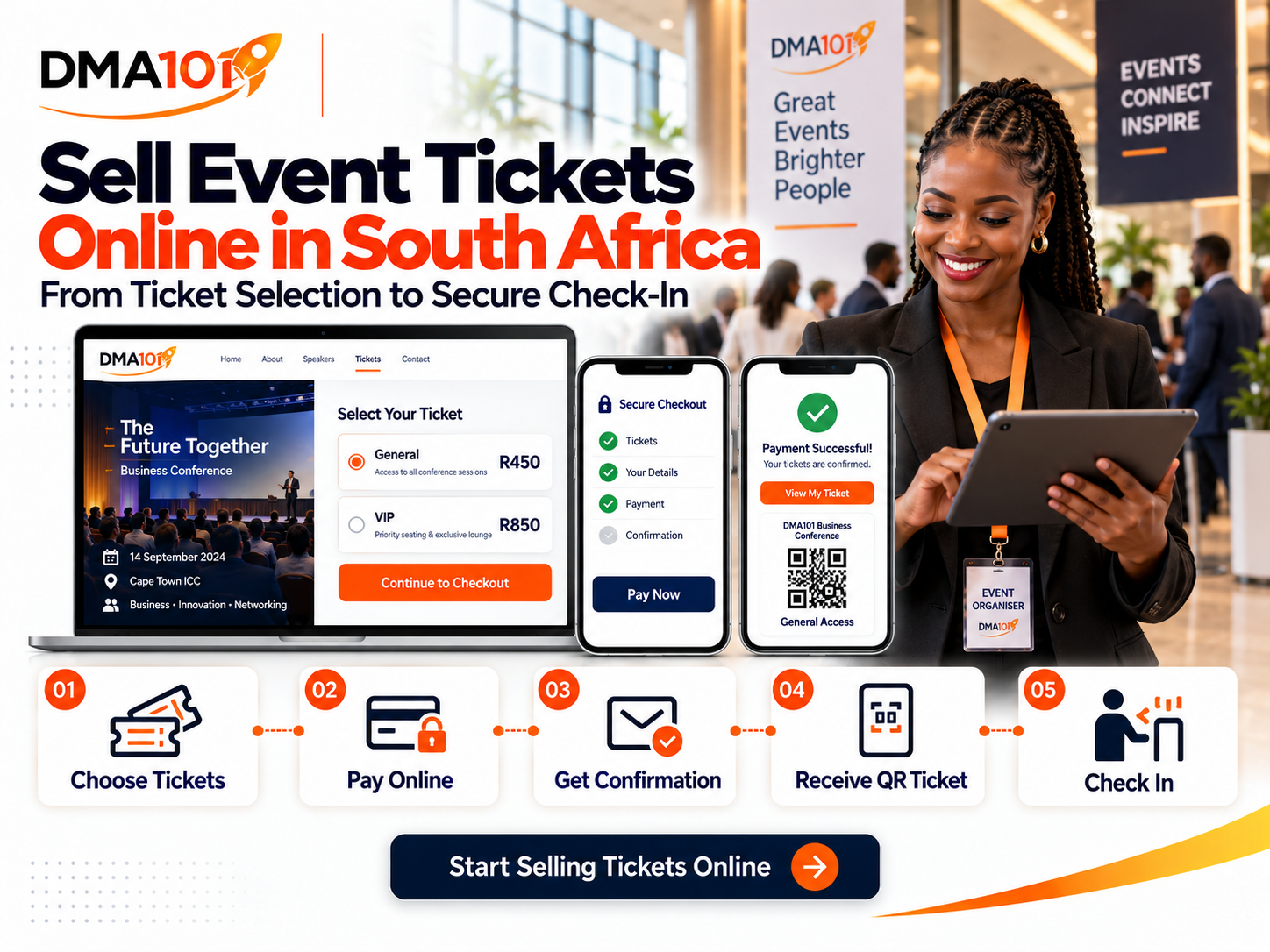
Selling event tickets online should be simple for the buyer and manageable for the organiser.
A potential attendee should be able to discover the event, choose a ticket, pay securely and receive confirmation without waiting for someone to respond manually.
Unfortunately, many organisers still rely on bank transfers, emailed proof of payment, WhatsApp messages and manually updated spreadsheets. This may work for a few attendees, but it becomes difficult to control as ticket sales increase.
An online event ticketing system connects the entire process, from ticket selection and payment to confirmation, reminders and venue check-in.
Here is what South African organisers need to know before selling tickets online.
Quick answer
To sell event tickets online in South Africa, you need a professional event page, clearly defined ticket categories with prices in Rand, a connected secure payment provider, immediate confirmation with digital QR-code tickets, automated reminders and a check-in process. The organiser manages ticket availability, payments, refunds, revenue and attendance from one central dashboard.
Test the complete checkout journey in test mode before enabling live payments.
What Does Online Event Ticketing Include?
Online event ticketing is more than placing a payment button on a website.
A complete system should allow attendees to:
- View the event information
- Compare ticket options
- See ticket prices in Rand
- Choose the number of tickets
- Enter attendee details
- Apply an eligible discount code
- Complete payment
- Receive confirmation
- Access individual digital tickets
- Receive event reminders
- Check in at the venue
The organiser should be able to monitor ticket availability, registrations, payment status, refunds, revenue and attendance from one central dashboard.
Why Manual Ticket Sales Become Difficult
Manual ticket sales create additional work at every stage.
The organiser may need to:
- 1Respond to the enquiry.
- 2Send banking details.
- 3Wait for proof of payment.
- 4Match the deposit to the buyer.
- 5Capture the attendee's information.
- 6Update a spreadsheet.
- 7Create or send a ticket.
- 8Send event information.
- 9Confirm payment again at the entrance.
- 10Record attendance manually.
Every additional step creates another opportunity for information to be delayed, duplicated or missed. Online ticketing allows the buyer to complete most of this journey without waiting for the organiser.
Create a Professional Event Page
The ticket-buying journey begins on the event page. Before asking someone to pay, give them enough information to make a confident decision.
Your page should include:
The event page should match your organisation's brand and work properly on mobile phones. Many South Africans will first see the event through Facebook, LinkedIn, Instagram, Google or WhatsApp. If the registration page is difficult to use on a phone, potential buyers may leave before completing payment.
Decide Which Tickets You Will Sell
Different ticket categories can serve different attendees and pricing strategies.
Common options include:
General admission
This is the standard ticket for normal event access.
VIP admission
A VIP ticket may include reserved seating, hospitality, exclusive sessions, priority check-in or access to selected speakers.
Early-bird tickets
Early-bird pricing encourages people to commit before a specific date. The quantity and sales period should be clearly controlled.
Student or member tickets
Reduced prices may be offered to verified students or members of an organisation.
Group tickets
Group offers can encourage companies, teams or organisations to send several attendees.
Complimentary tickets
Free tickets may be issued to speakers, sponsors, media representatives, staff or invited guests.
A ticketed event can include both free and paid ticket types. Each category should have a clear name, price, quantity and sales period.
Set Ticket Prices in Rand
South African buyers should be able to see the price clearly before checkout. Avoid adding unexpected fees at the final step.
When deciding on your ticket price, consider:
The advertised price and checkout amount should be consistent. If additional charges apply, explain them before payment.
Control Ticket Quantities
Every ticket category should have a defined quantity.
For example:
- General admission: 300 tickets
- VIP admission: 50 tickets
- Early-bird: 100 tickets
- Speakers and sponsors: 30 complimentary tickets
The overall event capacity should also reflect what the venue can safely and comfortably accommodate. Capacity controls help prevent overselling and allow the organiser to see which ticket categories are close to selling out.
Set Ticket Sales Periods
Tickets don't need to remain available indefinitely. Each ticket type can have a sales opening and closing period.
This is useful for:
The event timezone should be checked carefully because ticket sales and promotion periods depend on the configured date and time.
Connect Secure Online Payments
A paid event needs a properly connected payment provider. The payment provider handles the financial transaction, while the event system connects the payment result to the buyer's registration.
Before selling tickets, confirm that:
- The payment provider is correctly connected
- The correct currency is selected
- The business information is accurate
- The payout account is correct
- Live payment mode is enabled
- Test payments have been completed
- Successful and failed payments display correctly
- Refund procedures are understood
- The checkout works on mobile devices
Never publish a paid event before testing the complete transaction.
Test Mode and Live Mode
A professional event system should allow organisers to test the process before accepting real payments. In test mode, the team can check the registration and checkout experience without processing a live transaction.
Before launching, test:
Once testing is complete, the event must be moved into live mode so real payments can be processed.
Capture the Right Buyer and Attendee Information
The person paying for the tickets may not be the only person attending. For a single ticket, the buyer and attendee are usually the same person. For group purchases, the system should collect individual information for every attendee.
This may include:
Each attendee should receive an individual registration record and ticket. The buyer can receive an order summary covering the full purchase.
Keep the Checkout Short
Every additional checkout field increases the amount of work required from the buyer. Only collect information that is genuinely needed. A long registration form can reduce completed purchases, especially on mobile phones.
If information isn't needed for ticket delivery, event preparation, legal requirements or the attendee experience, consider removing it.
Use Discount Codes Strategically
Discount codes can help promote ticket sales without reducing the public price permanently.
They may be used for:
A code can be restricted by:
Avoid leaving discount codes active longer than intended.
Confirm Every Purchase Immediately
After payment, the buyer should receive immediate confirmation.
The message should contain:
Each additional attendee should receive their own confirmation and ticket where their details were captured. The buyer shouldn't need to send proof of payment or ask whether the order was successful.
Deliver Digital QR-Code Tickets
Every attendee can receive a digital ticket containing an individual QR code.
At the venue, staff scan the ticket to:
- Confirm that it's valid
- Check the payment status
- Detect duplicate use
- Confirm that it belongs to the correct event
- Record attendance
Eligible in-person tickets may also be saved to supported mobile wallets for easier access. A manual check-in option should remain available if an attendee loses their ticket or the QR code won't scan.
Create Clear Refund and Transfer Terms
Ticket buyers should understand the event's cancellation, refund and transfer rules before paying.
Explain:
Taking an event page offline doesn't automatically refund attendees. Refunds must be managed deliberately according to the organiser's policy and the connected payment process. Ticket transfers may also require the organiser to update attendee information manually. Clear terms protect both the organiser and the buyer.
Reduce Fraud and Ticket Sharing
Digital tickets may be forwarded or copied. An event check-in system helps detect when a ticket has already been used, a code belongs to another event, the registration doesn't meet the permitted payment status, or attendee information doesn't match the ticket.
Organisers can also reduce risk by:
- Sending tickets only after confirmed registration
- Using individual attendee records
- Checking identification where appropriate
- Limiting access to attendee information
- Training check-in staff
- Publishing clear ticket-transfer procedures
The system supports the process, but entrance staff still need clear rules.
Promote the Event With Tracking in Place
Before running advertisements, make sure registration and purchase tracking are configured correctly.
This helps the organiser understand:
Advertising should lead to the event page, not to a confusing chain of messages and manual payment instructions. The easier the buying journey, the easier it is to convert interest into ticket sales.
Automate Ticket-Buyer Communication
After purchasing, attendees should enter a planned communication journey.
Messages may include:
Communication can also be adjusted according to ticket type. VIP attendees, speakers, sponsors and general ticket holders may need different information.
Track Registrations, Payments and Attendance
The organiser should be able to view:
This allows the team to make better decisions before, during and after the event. Registration data shows who planned to attend. Check-in data shows who actually arrived.
Common Online Ticketing Mistakes
Avoid these mistakes:
- Publishing before completing a test purchase
- Using unclear ticket names
- Hiding important fees
- Creating too many ticket categories
- Forgetting sales deadlines
- Using a checkout that performs poorly on mobile
- Collecting unnecessary attendee information
- Failing to send immediate confirmation
- Not explaining refund terms
- Sending one ticket for an entire group
- Failing to train check-in staff
- Not preparing a manual check-in backup
- Assuming an unpublished event automatically triggers refunds
A successful ticketing system depends on both technology and operational planning.
Online Ticket Sales Checklist
Before launching, confirm that:
- The event page is complete
- Ticket names are clear
- Prices are displayed in Rand
- Ticket quantities are correct
- Sales periods are accurate
- Event capacity is set
- The payment account is connected
- Test payments work
- Live payment mode is enabled
- Group-attendee details are collected
- Confirmation messages are correct
- Digital tickets are delivered
- QR codes work
- Refund terms are published
- Mobile checkout has been tested
- Reminder messages are scheduled
- Check-in staff understand the process
- Manual check-in is available
- Post-event follow-up is prepared
Sell Event Tickets Online With DMA101
DMA101 can build a professional Event Management System that connects your event page, ticket options, online payments, attendee information, digital tickets, automated reminders, QR-code check-in and post-event follow-up.
The system can be configured for conferences, workshops, training programmes, church events, fundraisers, product launches, coaching events and corporate functions.
Your attendees get a simpler buying experience. Your team gets better control over registrations, payments and attendance.
Make it easier for people to discover, buy and attend your event.
Start Selling Event Tickets Online
Stop chasing proof of payment and updating spreadsheets by hand. We will set up your complete ticketing system so attendees can discover, buy and check in without the manual admin.
Start the Fit Check
Written by Digital Marketing Agency 101
Founder & Digital Growth Strategist at DMA101. Helping ambitious businesses build complete digital growth systems that convert.
Read more about our methodology →Have thoughts on this?
We'd love to hear your perspective. Join the conversation on LinkedIn or reach out directly.
Keep Reading
What Information Should You Collect on an Event Registration Form?
Learn exactly what information to collect on an event registration form, from essential contact details to dietary, accessibility and consent fields, without overwhelming attendees.
Read Article Events ManagementHow to Follow Up With Attendees After an Event
Learn how to follow up with attendees after an event, send thank-you messages, collect feedback, share resources and nurture leads with one connected system.
Read ArticleHow We Can Help
Basic Website Design (1-5 Pages)
Perfect for local businesses needing a clear, professional online presence. Includes home, about, services, and contact pages.
Explore ServicePremium Website Design (5-10 Pages)
Ideal for growing businesses. Includes advanced layouts, lead capture forms, service detail pages, and basic SEO.
Explore ServiceCorporate Website Design (10-25 Pages)
Comprehensive site for established companies. Includes custom integrations, advanced SEO, team directories, and resource centers.
Explore ServiceGet Growth Strategies in Your Inbox
Join other ambitious business owners receiving our best insights on websites, automation, and lead generation.
We respect your privacy. Unsubscribe at any time.
Ready to implement these strategies?
Partner with DMA101 to elevate your brand and build a premium digital presence.
Start the 60-Second Fit Check