

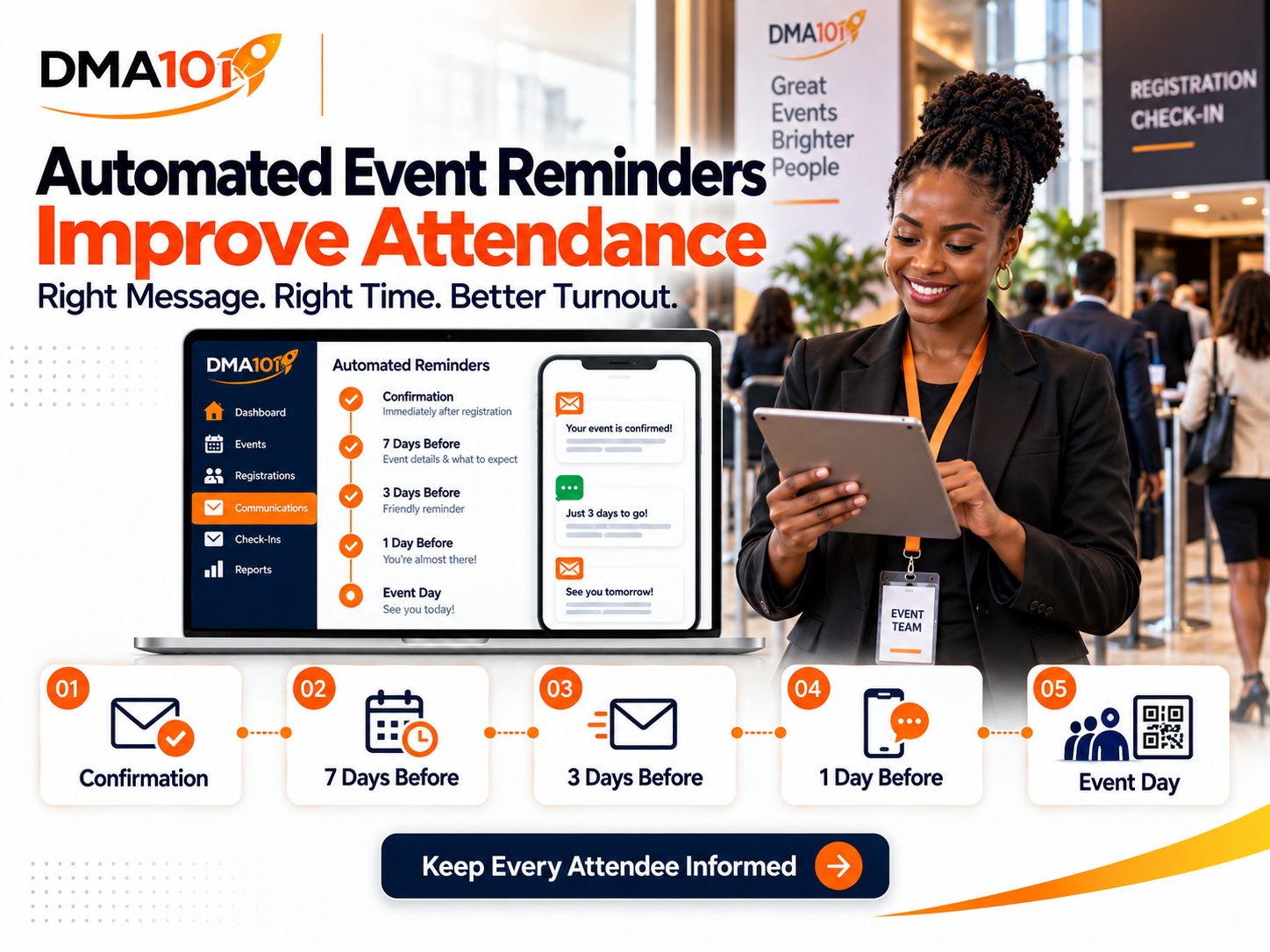
Getting people to register for an event is only the first step.
The next challenge is making sure they actually attend.
People register with good intentions, but life gets busy. They forget the date, lose the confirmation email, become uncertain about the venue or decide the event is no longer important enough to prioritise.
Automated event reminders help organisers stay connected with registered attendees from the moment they sign up until the event begins.
When reminders are timed properly and contain useful information, they can reduce preventable no-shows, answer common questions and create a more professional attendee experience.
Quick answer
Automated event reminders are pre-scheduled messages sent to registered attendees at key points before an event. A well-structured sequence, including an immediate confirmation, a one-week reminder, a three-day reminder, a one-day reminder and a same-day reminder, can significantly reduce preventable no-shows and improve the attendee experience.
Reminders should be personalised, relevant to the ticket type and tested before the registration page goes live.
What Are Automated Event Reminders?
Automated event reminders are pre-planned messages that are sent to registered attendees according to the date and time of an event.
Instead of an organiser manually sending every email or SMS, the event management system sends each message at the correct stage of the attendee journey.
A reminder sequence may begin immediately after registration and continue until the day of the event.
Messages can include:
- Registration confirmation
- Ticket and payment details
- Event date and time
- Venue information
- Online access instructions
- Parking details
- The event programme
- Speaker information
- Preparation requirements
- Digital tickets or QR codes
- Cancellation instructions
- Final arrival reminders
The system can also send follow-up messages after the event.
Why Event Reminders Matter
Registering for an event doesn't always mean the person has made a firm commitment.
Some attendees register months in advance. Others sign up quickly after seeing a social media post. A free registration may take less than a minute to complete.
Without continued communication, the event can disappear from the attendee's attention.
Reminders keep the event visible and help the attendee prepare. They also show that the organiser is professional, organised and ready to welcome them.
Reminders Do More Than Prevent Forgetfulness
The obvious purpose of a reminder is to help people remember the event. However, an effective reminder sequence does much more.
It can:
- Reconfirm the value of attending
- Reduce uncertainty
- Provide practical instructions
- Build excitement
- Help attendees plan transport
- Give people time to ask questions
- Encourage cancellations when plans change
- Protect online access information
- Help attendees locate their tickets
- Prepare guests for a faster check-in process
A useful reminder gives the attendee a reason to open it.
The Difference Between a Confirmation and a Reminder
A confirmation is sent immediately after someone registers. Its purpose is to reassure the attendee that the registration was successful.
A reminder is sent later, usually at a scheduled time before the event. Its purpose is to keep the event visible and provide the information the attendee needs at that stage.
Both are important. A person who receives reminders without first receiving a proper confirmation may remain unsure whether the registration was completed correctly.
What Should a Registration Confirmation Include?
The first message should arrive immediately after registration.
It should include:
For group registrations, each attendee should receive information connected to their own ticket where possible. The buyer may also receive an order summary showing all tickets purchased.
A Practical Event Reminder Timeline
There is no single reminder sequence that suits every event. The timing should depend on how far in advance people register, the type of event and how much preparation is required.
The following timeline provides a practical starting point.
Immediately After Registration
Send a confirmation as soon as the registration is completed. This message should confirm that the person is registered and explain what will happen next. For paid events, include the payment or order information. For in-person events, include the digital ticket. For online events, explain when access details will become available. Avoid filling this message with unnecessary promotional content. Its main purpose is confirmation and clarity.
Several Weeks Before the Event
This message is useful when registrations open far in advance. Its purpose is to reintroduce the event and remind attendees why they registered. You could include a speaker announcement, a programme update, a short preview, an attendee resource, accommodation information, a networking opportunity or an early preparation checklist. This message should create interest without making attendees feel that they're being constantly marketed to.
Seven Days Before the Event
A one-week reminder should combine value with practical preparation. Include the event date and time, venue or online format, programme highlights, speaker information, preparation requirements, what to bring and contact information. If the event requires travel, this is a good time to remind attendees to finalise their arrangements.
Three Days Before the Event
At this stage, focus more heavily on practical details. For an in-person event, include the full venue address, map or directions, parking information, registration desk opening time, starting time, dress requirements, what to bring and digital ticket information. For an online event, include access instructions, technical requirements, start time and timezone, recommended login time and support contact details. You can also provide a simple way for attendees to cancel if their plans have changed.
One Day Before the Event
Keep this reminder short and easy to scan. The attendee should be able to understand the most important information within seconds. Include the event name, "Tomorrow" in the subject or opening line, starting time, venue or online access, arrival or login time, QR-code ticket or access link and contact details. Avoid introducing large amounts of new information one day before the event.
A Few Hours Before the Event
A final reminder should be brief. For an in-person event, it could say: "We're looking forward to welcoming you today. Registration opens at 08:00 and the programme begins at 09:00. Please have your QR-code ticket ready when you arrive." For an online event, it could say: "We're starting in two hours. Please use the link below to join and log in at least 10 minutes early." The goal is to remove the final barrier between the attendee and the event.
Email or SMS: Which Is Better?
Email and SMS serve different purposes.
Email reminders
Email is useful when the message contains detailed information.
It works well for registration confirmations, programmes, speaker information, venue instructions, preparation guides, receipts, digital tickets and post-event resources.
SMS reminders
SMS is useful for short, urgent or time-sensitive updates.
It works well for one-day reminders, same-day notifications, venue changes, starting-time reminders, short check-in instructions and important last-minute updates.
A strong event communication plan can use both channels. Email carries the details, while SMS draws attention to time-sensitive information.
What About WhatsApp Reminders?
WhatsApp can be valuable in South Africa because many attendees use it as a primary communication channel.
However, WhatsApp communication should be handled carefully. Messages should be expected, relevant and sent with the appropriate permission. Attendees shouldn't feel that joining an event has added them to an unrelated marketing list.
WhatsApp is best used for:
- Important event updates
- Short reminders
- Directions
- Support
- Access information
- Urgent changes
Avoid creating unnecessary groups that expose attendees' contact details to one another.
Personalise the Message
A reminder shouldn't feel as though it was sent to an anonymous list.
Personalisation can include:
Different attendees may need different communication. A VIP guest may have a separate entrance or reception area. A speaker needs arrival and technical information. An online attendee needs an access link. A general ticket holder needs normal check-in instructions. One generic message may not serve all of them properly.
Use Different Reminders for Different Ticket Types
An event management system can separate attendees according to their ticket or registration category. This allows organisers to create more relevant communication.
For example:
General admission
Send standard venue, programme and check-in information.
VIP attendees
Include VIP arrival instructions, reserved seating, special sessions or hospitality information.
Speakers
Send technical requirements, presentation deadlines, arrival times and contact details for the event team.
Sponsors and exhibitors
Include setup times, stand information, delivery instructions and access arrangements.
Online attendees
Provide the correct access link, timezone and technical support information.
Relevant messages are more useful and more likely to be read.
Handle Late Registrations Properly
Someone who registers one day before the event shouldn't receive messages intended for attendees who registered months earlier.
The reminder process should recognise where the person is in relation to the event date.
A late registrant may need:
- Immediate confirmation
- Final venue instructions
- A digital ticket
- The programme
- A same-day or next-day reminder
They shouldn't be held in a long sequence waiting for messages that are no longer relevant.
Stop Reminders When Someone Cancels
An attendee who cancels shouldn't continue receiving messages telling them to prepare for the event. This can create frustration and make the organiser appear disorganised.
When a registration status changes to cancelled, the attendee should be removed from the active reminder journey. They may then receive a separate cancellation confirmation or future-event invitation where appropriate.
Refunds and ticket transfers should also be handled according to the organiser's published policy.
Don't Overdo It
More reminders don't automatically create better attendance. Too many messages can annoy attendees, weaken trust and cause them to ignore important communication.
Each reminder should have a clear purpose.
Before adding a message, ask:
- Is this information useful?
- Is this the right time to send it?
- Has the attendee already received it?
- Does this message help them prepare?
- Is the message appropriate for this ticket type?
- Would I find this helpful if I were attending?
A smaller number of useful messages is better than constant communication with no real value.
Write Reminder Messages That People Can Scan
Attendees often read reminders on their phones.
Use:
Avoid hiding the date, time or venue inside a long block of promotional copy. The practical information should always be easy to find.
Common Event Reminder Mistakes
Organisers should avoid:
- Sending the first reminder too late
- Forgetting to send an immediate confirmation
- Using the wrong date or time
- Ignoring the event timezone
- Sending an outdated venue address
- Including broken access links
- Sending the same message to every ticket category
- Forgetting mobile users
- Continuing reminders after cancellation
- Sending too many messages
- Using cold, robotic wording
- Failing to test the entire sequence
Every reminder should be reviewed before the registration page goes live.
Test the Automation Before Launching
Testing is essential. Create a test registration and check:
- Whether the confirmation arrives
- Whether personal details appear correctly
- Whether the event date and time are accurate
- Whether the ticket or QR code opens
- Whether all buttons and links work
- Whether messages display properly on mobile
- Whether reminders are scheduled at the correct times
- Whether cancelled registrations stop receiving reminders
- Whether late registrations follow the correct path
Also test what happens when an attendee registers after one of the scheduled reminder times has already passed.
Measure Whether the Reminder Sequence Works
After the event, compare registration and attendance information.
Review:
Look for patterns. If many attendees still ask for the venue address, the information may not be clear enough. If online attendees join late, the final reminder may need to explain the login time more clearly. Use what you learn to improve the next event.
What Happens After the Event?
Automated communication remains valuable after the event.
Attendees can receive:
Registered no-shows should usually receive a different message. They might receive a short event summary, recording or invitation to a future session without being made to feel guilty for missing the event.
Build a Better Attendee Journey With DMA101
Event reminders shouldn't depend on someone remembering to send them manually.
DMA101 can build an Event Management System that connects registration, ticketing, payments, attendee information, email and SMS reminders, QR-code check-in and post-event follow-up.
Your communication can be scheduled around the event date and personalised according to the attendee's registration and ticket information.
The result is a more organised process for your team and a clearer experience for every attendee.
Keep attendees informed, prepared and ready to arrive.
Build Your Event Reminder System With DMA101
Stop sending reminders manually and hoping people remember. We will set up your complete events system so attendees stay informed, prepared and present from registration to revenue.
Start the Fit Check
Written by Digital Marketing Agency 101
Founder & Digital Growth Strategist at DMA101. Helping ambitious businesses build complete digital growth systems that convert.
Read more about our methodology →Have thoughts on this?
We'd love to hear your perspective. Join the conversation on LinkedIn or reach out directly.
Keep Reading
What Information Should You Collect on an Event Registration Form?
Learn exactly what information to collect on an event registration form, from essential contact details to dietary, accessibility and consent fields, without overwhelming attendees.
Read Article Events ManagementHow to Follow Up With Attendees After an Event
Learn how to follow up with attendees after an event, send thank-you messages, collect feedback, share resources and nurture leads with one connected system.
Read ArticleHow We Can Help
Basic Website Design (1-5 Pages)
Perfect for local businesses needing a clear, professional online presence. Includes home, about, services, and contact pages.
Explore ServicePremium Website Design (5-10 Pages)
Ideal for growing businesses. Includes advanced layouts, lead capture forms, service detail pages, and basic SEO.
Explore ServiceCorporate Website Design (10-25 Pages)
Comprehensive site for established companies. Includes custom integrations, advanced SEO, team directories, and resource centers.
Explore ServiceGet Growth Strategies in Your Inbox
Join other ambitious business owners receiving our best insights on websites, automation, and lead generation.
We respect your privacy. Unsubscribe at any time.
Ready to implement these strategies?
Partner with DMA101 to elevate your brand and build a premium digital presence.
Start the 60-Second Fit Check